

 Biohub
License: ESM C SAE Features is open source and free for academic and commercial use under an MIT license. Please refer to the license for full terms.
Proto is not affiliated with Biohub. This toolkit is open source and builds on the implementation produced by this organization. Product names, logos, and trademarks are the property of their respective owners.
Biohub/esm

 biohub/ESMC-SAE-Overview View model
Language Modeling Materializes a World Model of Protein Biology
 evo-design/proto-tools/proto_tools/tools/masked_models/esmc_sae
Open Notebook
Open notebook
Run locally with proto-tools


Background
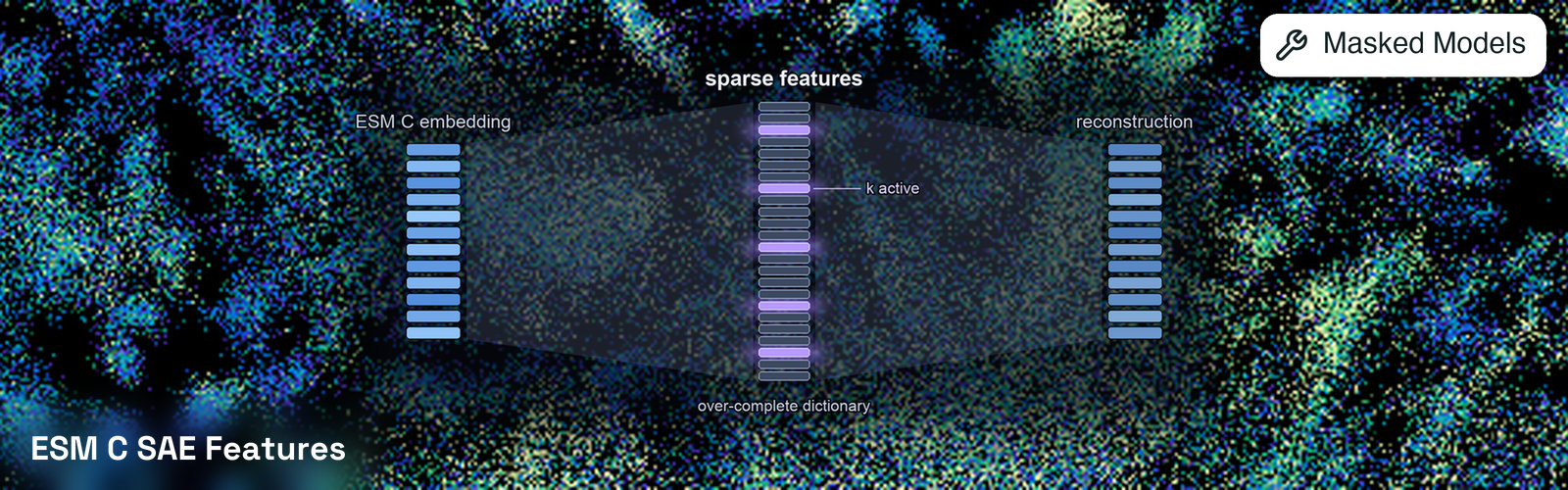
An SAE is trained to reconstruct a language model’s internal activations through a bottleneck that permits onlyk active features per position out of a much larger codebook. The sparsity pressure pushes individual features toward single interpretable concepts, so a feature may correspond to a specific structural or functional property such as a zinc-binding site, a beta barrel, or a transmembrane helix. Biohub trained SAEs on ESM C using the TopK approach and used them to organize the ESM Atlas, a map of 6.8 billion proteins (Biohub).
The SAEs were trained with two structural hyperparameters that set granularity. k fixes how many features are allowed to activate per residue, with lower values not able to reconstruct the activation as accurately — but higher values are harder to interpret, since a residue explained by 512 features is barely more legible than the dense embedding the SAE replaced. k=64 is the balance Biohub trained across every layer. Additionally, the codebook_size of each SAE fixes how many features exist in total. Small codebooks group related concepts into one feature, for example a single metal-binding feature; large codebooks split that into dedicated zinc-finger, iron-sulfur, and calcium-binding features.
Every combination of these is a separately trained model, not a runtime setting. An SAE learns its dictionary against one backbone, one layer, one k, and one codebook_size, so those values are fixed in the weights. model_checkpoint, sae_target, layers, k, and codebook_size therefore act together as a selector: the tool composes them into a HuggingFace repo id and loads that SAE. Biohub published 97 such SAEs, and only some combinations exist, so the config rejects the ones that do not and names the valid alternatives.
Tools
ESM C SAE Features (esmc-sae-features)
Runs each sequence through the ESM C backbone once with SAEs attached to the requested layers, and returns the active codebook features at each residue, ordered by descending magnitude. Start and end tokens are stripped so positions align with the input sequence: feature_indices[0] holds the features for residue 1, and the position column of an exported CSV is 1-indexed, matching the rest of proto-tools.API Reference
Source
Input: MaskedModelInput
Input: MaskedModelInput
List[string]
required
Protein sequence(s) to process. Can be provided as:
Source
Config: ESMCSAEFeaturesConfig
Config: ESMCSAEFeaturesConfig
enum
default:"esmc_300m"
ESM C backbone whose activations are decomposed. The SAE must match the backbone it was trained on.Available options:
esmc_300m, esmc_600m, esmc_6barray
Backbone layers to attach SAEs to.
None uses the ~75%-depth layer Biohub sweeps (300M: 23, 600M: 27, 6B: 60). Each layer adds a download and GPU memory.enum
default:"hidden_states"
Which activations the SAE was trained on. Hidden states give a global view; MLP outputs isolate one layer’s computation.Available options:
hidden_states, mlp_outputsenum
default:"64"
Active features per residue. Fixed in the SAE’s weights, so this selects a model rather than a threshold; only
64 was trained against every layer, and other values exist solely at the sweep layer.Available options: 16, 32, 64, 128, 256, 512enum
default:"16384"
Total features the SAE can represent, also fixed in its weights. Larger codebooks split concepts more finely; which sizes exist depends on
model_checkpoint and sae_target.Available options: 8192, 16384, 32768, 65536, 131072enum
default:"transformers"
Which ESM C implementation supplies the activations the SAE reads.
"transformers" matches the published SAE documentation. "esm" reads the esmc toolkit’s weights instead, avoiding a second backbone download at the cost of ~1% disagreement in active features.Available options: transformers, esminteger
default:"1"
Sequences per forward pass.
integer
default:"0"
Verbosity level (0=quiet, 1=info, 2=debug, 3=raw subprocess stderr).
True is coerced to 1 and False to 0.string
default:"cuda"
Device to run the model on.
integer
default:"3600"
Maximum execution time in seconds.
None waits indefinitely.integer
Random seed. When set, tools run reproducibly up to small GPU float noise (see
BaseToolOutput.approx_equal), and the seed participates in cache keys. When None, cacheable seed-sensitive tools skip cache until seeded. Source
Output: ESMCSAEFeaturesOutput
Output: ESMCSAEFeaturesOutput
List[SequenceSAEFeatures]
required
Per-sequence SAE features, index-parallel with the input sequences.
Applications
Feature activations show which concepts the model recognizes at each residue, which supports interpreting what drives an embedding, locating functional sites without supervision, and comparing how proteins are represented internally. Because features are sparse and indexed, activations are directly comparable across proteins: within one SAE, a feature index always denotes the same learned concept. Indices are not comparable between different SAEs, including different layers of the same backbone, since each is trained separately and orders its codebook arbitrarily. TheESMC-6B-sae-layer60-k64-codebook16384 SAE additionally has agent-generated natural-language descriptions for its codebook, available through the ESM Atlas.Usage Tips
layersselects which activations are decomposed. The default is the ~75%-depth layer Biohub sweeps (300M: 23, 600M: 27, 6B: 60), where representations transfer best to downstream tasks. Each extra layer adds a download and GPU memory.sae_targetpicks what the SAE reads.hidden_states(the default) decomposes the accumulated residual stream after a block, so features reflect everything the model has built up to that depth; it is what the ESM Atlas and the published feature descriptions use.mlp_outputsdecomposes only that block’s own MLP contribution before the residual add, which attributes a feature to one layer’s computation. MLP-output SAEs are published only atcodebook_size=131072.kandcodebook_sizeare only free at the sweep layer. All-layer SAEs exist atk=64and one codebook size, so varying either requireslayersto be exactly the sweep layer. The config rejects unpublished combinations and names the valid alternatives.- Only requested layers are downloaded, and layer size tracks
codebook_size. Each layer file holds an encoder and decoder ofd_model x codebook_sizeweights, so a hidden-state layer is 0.13 GB on 300M and 0.34 GB on 6B, while an MLP-output layer (131072 codebook) is 1.0 GB and 2.7 GB respectively. Requesting every layer of the 6B MLP collection would pull roughly 217 GB; the tool logs a warning past 10 GB rather than refusing, since a deliberate multi-layer sweep is legitimate. - Rank features by normalized activation, not raw magnitude. The largest raw activations belong to features that fire on nearly every protein and say little. Biohub’s published statistics correct for this:
(activation / uniref90_max_activation) * uniref90_idfscales a feature to [0, 1] and upweights rare ones.describe_sae_featuresinhelpers.pyreturns both statistics alongside each feature’s label, for the one SAE with published descriptions (ESMC-6B-sae-layer60-k64-codebook16384, which the 6B defaults resolve to). - Output size scales with
ktimes sequence length. Each residue carrieskindices andkmagnitudes, so a 300-residue protein atk=64yields 19,200 pairs per layer.
Toolkit Notes
These apply to every ESM C SAE tool in this toolkit (esmc-sae-features).
- This toolkit shares the Biohub
esmenvironment with ESM C and ESM3. All three use thebiohub_esmenv; installing any one installs it for all. - The backbone is loaded through Transformers, not the
esmpackage. The SAE API is defined on the Transformers ESM C model, so this toolkit loadsbiohub/ESMC-300Mand siblings rather than theesm-package weights theesmctoolkit uses. Both repos hold the same parameters in different serializations, so using both toolkits downloads the backbone twice: 1.3 GB for 300M, 2.3 GB for 600M, 25.4 GB for 6B. This is deliberate — the SAEs are published and documented against the Transformers model, and reading theesm-package activations instead agrees on only about 99% of active features, which is the wrong trade for an interpretability tool. batch_sizecontrols memory usage. Lower it if you run out of GPU memory. For repeated calls, useToolInstance.persist_tool("esmc_sae")to keep the backbone and SAEs loaded between calls.
Infrastructure Guides
The following guides cover how to run tools efficiently and at scale.Tool Persistence
Keep a tool’s model warm across calls instead of reloading it every invocation.
Device Management
How GPUs are allocated to tools and how to target specific devices.
Parallel Execution
Fan a batch of inputs out across multiple GPUs.